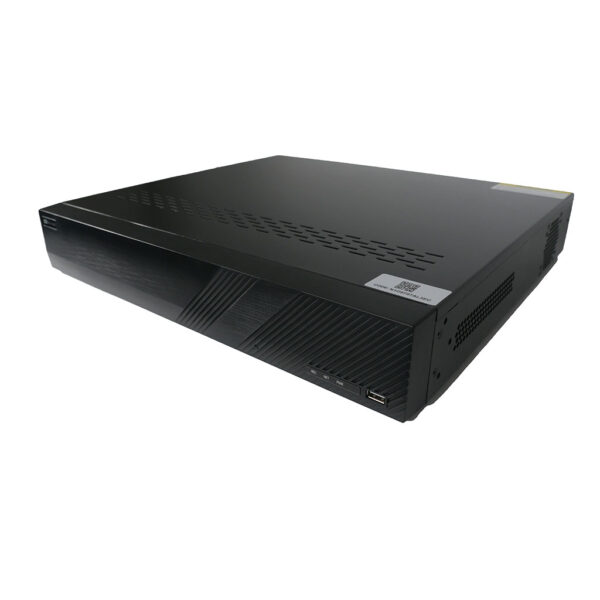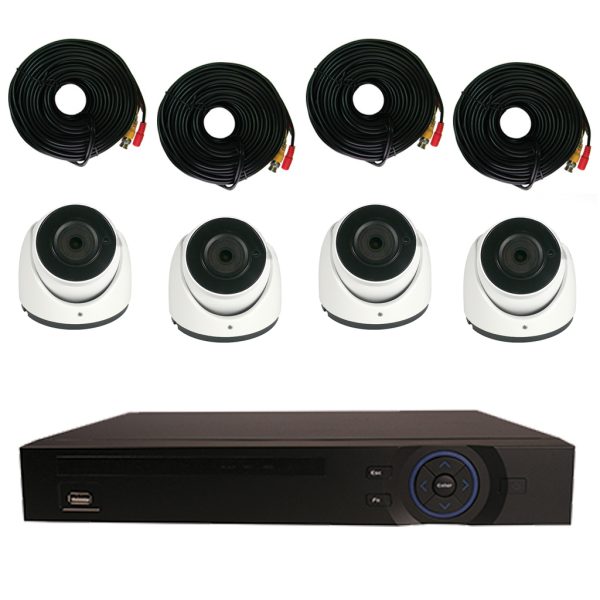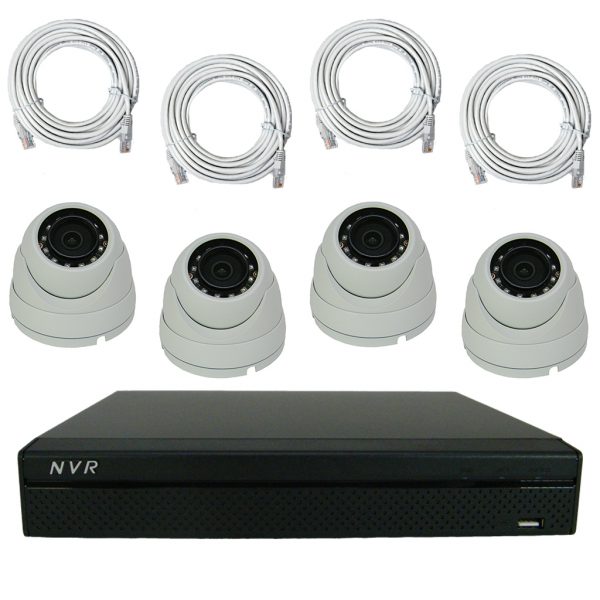
This DVR system doesn't include a VGA monitor. In order to setup the DVR, you will need a VGA monitor, but after you've installed the DVR system, the monitor isn't required for normal operation. You can access the DVR remotely and control everything.
Our Elite Mini Economy Series is the best value we offer in high quality DVRs. Do not let the word economy fool you. Our Economy series is still ahead of most of our competitors in features and quality. This series can record realtime video on all channels at the same time in CIF resolution and can record the highest resolution setting (D1 resolution) at 7fps. All of our DVRs share the same menus, softwares and most features so if you know how to use one, you know them all. This DVR can hold one hard drive up to 3TB of internal storage. It has a VGA and BNC video output, RS485 for PTZ control and one audio input for microphone.
If you need to purchase a monitor, we offer a wide assortment of monitors. Click Here
Our Elite Economy Series DVR comes installed with an embedded version of Linux OS. They also come equipped with audio recording, remote monitoring from anywhere in the world via the internet (Internet Explorer) and H.264 compression. Our Elite Economy Series DVR is not a PC based DVR, which are susceptible to viruses and hacking. The Elite Economy Series DVR is a standalone unit, built for one purpose, to provide you with the best quality video surveillance in the world.
The Elite Mini Economy Series DVR is extremely versatile. It comes equipped with BNC ,VGA and HDMI video outputs, which allows you to operate multiple monitors simultaneously. You can even hook the DVR up to a big screen television.
The Elite Mini Economy Series utilizes H.264 hardware compression to bring you great quality video while maximizing your hard disk storage capacity. This DVR brings you the maximum in recording versatility by being able to record CIF resolution on all channels at 30fps.You can also record D1 resolution at 7fps on every channel.
The Elite Mini Economy Series DVR is very simple to setup and operate. The DVR interface is mouse-driven, which gives you a very simple point-and-click control over all the functions and settings with-in the DVR. The DVR also comes with an IR remote, which gives you control over all of the functions and settings with-in the DVR. The front of the DVR can be used to rewind, fast forward and advance frame by frame. Up to 8 Channels can be played back at the same time at the DVR and up to 4 channels can be played back at the same time via the web interface or our client software.
Our Elite Mini Economy Series DVR comes with a built-in web server, which allows you to perform almost every function of the DVR remotely with Internet Explorer. We also include a copy of our client software, which allows you to control multiple Elite Mini Economy Series DVRs simultaneously. The DVR also comes equipped with Two-Way audio, which can be used over the network or over the internet. Now you can hear everything going on and even communicate with everyone! The DVR supports up to 10 network or internet users simultaneously. And, with Dynamic DNS Support, you don't need to have a static IP Address from your ISP (Internet Service Provider) to view your DVR remotely. This is turn saves you money, due to the fact, that most ISPs (Internet Service Providers) charge an additional fee to obtain a Static IP Address.
The Elite Mini Economy Series DVR has a feature called POP E-mail Notification. This feature requires you to have a POP e-mail address. You then configure your DVR to send you e-mail updates based on the criteria that you setup in the DVR. So, even if you're not by a computer, you can still stay up-to-date with your DVR system.
Our Elite Economy Series DVR supports only one SATA hard drive, but with up to 2TB of hard drive space, you won't have any problems store your footage. Due to the slim design of the Elite Mini Economy DVR, it doesn't hold a DVD burner, but the DVR does come equipped with a USB port, so you will be able to back up your DVR on a USB thumb drive. Your video footage can also be directly on your PC or you can perform and a FTP backup.
This system runs on a rock solid Linux embedded OS, with embedded web server, and digital signal processors to bring you the most powerful network-based digital video recorder available. This high end system will provide you with everything you need other than a monitor. If you tie the system into your network, you wont even need a monitor to view your DVR.
Techpro Security Products will repair or replace (at our option), without charge, any product
proven defective in material or workmanship. The warranty period for specific product types is listed below.
This is a Video Demonstration of our 4CH Elite Mini Economy Series DVR.
Unboxing of the OD-CM600IR50-B
This is the unboxing of the OD-CM600IR50-B camera.
Local Interface for Federal, HD SDI and Hybrid DVRs
This is a video demonstration of our DVR's Interface locally. in this video We will show you some of the amazing features that our units carry.
Remote Viewing of the Elite Mini, Elite, and Ultimate Series Security DVR
This video is a quick demo of remote access to our DVRs. All of our DVRs can be connected to remotely in this manner. You can use Internet Explorer, Google Chrome, Firefox and other browsers from any internet connected PC. Additionally, we have software available for remote access from MAC computers.
Quick Demo Of Our Video Management Software
This video is a quick demo of our video management software (PSS) that allows you to remotely connect to multiple DVRs, NVRs and IP cameras at multiple locations at once. With this software, you can set up camera groups, E-Maps, control PTZs, listen to audio and configure all the DVRs, NVRs and IP cameras. If you own multiple businesses or homes this software is ideal for you.
TechproSS Plus iPhone Demo
This is a quick demo of our new redesigned TechproSS Plus App for iPhone, iPods and iPads. This software is packed with a lot of new features that will allow you to remotely or locally view and manage your Techvision CCTV surveillance system
TechproSS Plus iPad Demo
This is a quick demonstration of our new app for iPad. TechproSS Plus is packed with awesome features allowing you to remotely see your cameras, manage sub stream resolution, activate alarm inputs and much more.
TechproSS Plus Android Demo
This is a quick video demonstration of our new App for Android TechproSS Plus.
In this video you will see some of the features that this app offers such as channel configuration, Push notifications, Playback and more.
Complete 4 Channel Elite Mini Economy DVR Security Camera Surveillance System
Review by Maither, Dana Rainbow World on Apr 30, 2013
Sometime ago, we purchased your complete 4 Channel Elite Mini Economy DVR Security Camera Surveillance System, Product Number PACK-ELITE-4-MINI-E. We didn't actually purchase the system as much for security purposes such as night time robberies or break-ins or that sort of thing, but rather to use as a monitoring system for our new daycare and preschool business. I am happy to report that since that time it has worked extremely well and our customers are even more satisfied but I'll write more about that in a minute.
Our system was shipped as soon as we placed the order. We received the shipment within three days. I installed the system myself, which was easy to do. I mounted the four cameras in our four major activity areas using just screws to actually mount the cameras (and their casings). The cameras will easily mount on the wall or ceiling. In fact, in one room the best shot of the room I could get was by mounting the camera on a hanging ceiling panel. The cameras are light enough to do this and I just had to be careful to make sure the screws didn't strip out the cheap ceiling board material. The wiring or cabling was fairly easy too. All cameras ran directly to the DVR which was located in our business office. Most of the time I could hang the wire above the hanging ceiling panels and then just drill holes through walls if they needed to be crossed. We used one of our VGA monitors to set the whole system up. Once the system was set up, we removed the monitor, because we really had no need to monitor the system here at the center. I connected the DVR to our Cat5 Ethernet feed and used the easy on screen display menus to set everything up.
Here is the best part. As each new customer comes to inquire about our services we explain to them that we have constant daily monitoring that they can use to check in on their children and their workers to ensure their safety and security and give them peace of mind while they are at work or where ever. All they need is an Internet connection and Internet Explorer. We ask that they only use the syste to "Look -in" and not keep it on all day on their computers. With the DVR's ability to handle 10 different users at once it works beautifully.
To sum it all up our system was easy to install, easy to set up, and it works very well. It serves our customers' needs as a constant monitor and we have had no problems with the system whatsoever. I would recommend this system to others that need an economical system to monitor their daycare or pre-school facilities.
Complete 4 Channel Elite Mini Economy DVR Security Camera Surveillance System
Review by Marlene Best on Mar 31, 2013
This isn't a bad little 4 camera security system. In fact the components all seem to work really well (more about them in a moment). My only complaint is the price tag. I was recommended to Security Camera King by a friend but I must say that after purchasing my 4 channel Elite Mini Economy system I have noticed prices for similar systems that are much cheaper. Whether the quality matches up, I can't say but to be fair like I said earlier, everything in my system works fine. Obviously I am not a CCTV professional (if I were I would think I would have my own system supplier or something), but I did install this system on the exterior of my small Cape Cod home myself. Since I have a small house, I had plenty of wire length to run between the cameras and the DVR but I'm not sure that would be the case for all houses so if you are unsure it is best that you measure your distances before ordering. The video and power wires are placed together and already have the connectors fitted on them to save you the hassle of having to install them yourself. I guess the wire is pretty good quality, however it definitely is NOT RG59 coaxial cable. I guess because either I didn't think it through or just do o my plain lack of experience I had a little issue with the wires. I drilled my holes with a drill bit just bigger than the wires to make a real neat and tidy installation and then I realized that wouldn't work because the holes had to be gig enough to accommodate the BNC connectors (the bigger of the two). After feeding the connectors and wire through, when my installation was nearly complete, I went back to every drilled hole and filled it with filler. The cameras were pretty easy to mount and set up, the fit nicely under the eaves but they could easily mount to a wall or just about any flat surface. The 600 TVL resolution produces a good color picture during the day and a good black and white picture at night both of which are pretty clear and detailed. The DVR is pretty good although the only video outputs are the BNC or VGA ports; no HDMI here. So if you do use a permanent monitor, you need to make sure it has either a BNC or VGA connection. The biggest and best feature for me on the DVR is the ability to access the DVR remotely from a computer or a smartphone. You can also have the DVR send you an e-mail when a camera's motion detection is triggered.
Complete 4 Channel Elite Mini Economy DVR Security Camera Surveillance System
1 of 1 people found this posting helpful
Review by Kathy Stillen on Mar 06, 2013
I own a small Cape Cod house in an urban area and I thought maybe it was best that it was time for an outdoor security system since I am a single female. I work for a major business firm in the networking department and I am also a certified electrician, so I didn't expect the installation of the system to present much of a challenge to me. As it turns out it didn't, but let me also say this. Anyone (male or female) can easily install one of these systems yourself, especially with Security Camera King's support department's assistance. Those guys are great and giving you a hand when you need it and they don't give you a run around that is typical for many support staffs. They know their products too inside and out. So, if there is any woman out there that doesn't think she could install this system herself and save a ton on installation fees, think again. As far as the actually equipment is concerned it works great! I didn't need anything overly fancy and four cameras were just enough to give me perimeter coverage of the exterior of my small house. The cameras were easy to install (especially if you have an electric screwdriver) and the DVR was easy to connect and set up too. Probably the biggest challenge for something like this would be installing the wiring, and that would be based on your individual circumstances. The recording and monitoring of the cameras by the DVR is excellent. I use my living room television as a monitor and simply plugged the DVR into it using the VGA connection. One of the things I like the most about this system is the remote access using the Internet. I can use my computer at work or my iPhone when I am on travel to monitor my cameras and gain access to my system from just about anywhere that I can get Internet service. I also have my DVR set up to send me e-mail alerts when the cameras detect motion so I can check back on the system right away to see what's happening at home
Complete 4 Channel Elite Mini Economy DVR Security Camera Surveillance System
1 of 1 people found this posting helpful
Review by Sean Armstrong on Feb 19, 2013
I recently purchased your Security Camera King Complete 4 Channel Elite Mini Economy DVR security Camera Surveillance System for just over $500.00 (that includes the 250 gig hard drive and upgraded 600 TVL cameras to the 100 foot infrared range). Thankfully, I was able to mount the domes under the eaves around the perimeter of my house; however as a suggestion it would be nice if you would offer the system with inexpensive bullet cameras that may give a little more flexibility in mounting. Probably, the most difficult part for me at least, was running the cables. I must admit that wasn't really hard but it was the most labor intensive. The DVR is pretty amazing. I was originally stead fast on recording in real-time rates (30 frames per second) because I thought it would be necessary to get the motion as real as possible. However, after installing my system and seeing the difference in size between CIF and D1, I changed my recording settings to D1. Even though the D1 resolution must record at a lower frame rate of 7 frames per second, I find this adequate for my use at home. I have recently replaced my old computer with completely new equipment, so I was able to use the older VGA LCD monitor with my security system. I prefer that instead of using my regular LCD TV because I prefer to have the DVR located somewhere a little less obvious. For the benefit of other home users, the DVR comes with its own USB mouse and infrared remote control that you can use to operate the DVR and access its On Screen Display (OSD) menu. I like the remote access feature. I have to admit that I'm not much of a network knowledgeable person so the manual seemed a little "hazy" to me in getting this set up. I contacted your support department, they explained to me how to do it, then they did it for me, which was great!
Complete 4 Channel Elite Mini Economy DVR Security Camera Surveillance System
1 of 1 people found this posting helpful
Review by Kurt Starr on Feb 05, 2013
Not a bad system at a decent price. There's not much to this package as far as additional options or features are concerned for the DVR or the cameras, but to be honest, I wouldn't really expect much more. The cameras are a basic 600 TVL color dome camera with automatic infrared mode recording. I get about 50 feet of infrared range from the camera's built in IR LEDs at night time. That's more than what I need. The 3.6 mm wide angle lens still does a good job of capturing a clear shot while maintaining a broad viewing area. The DVR is what really makes this package amazing. Even though it's only a four channel VGA display monitor DVR, it still has many advanced recording features and impressively integrates well with the Internet to provide remote access viewing and control. The DVR records in two resolutions CIF and D1. If your preference is frame rate over resolution than you most likely chose the CIF at 30 frames per second option and if your preference is large video resolution than you'll likely go with D1 at 7 frames per second. It's nice that you actually have a choice here. The DVR comes with a USB mouse and an infrared remote control, but to be honest most of my accessing is done from my computer or my iPhone. there's no room for a DVD burner but you really don't need one. You can actually transfer more data using a USB thumb drive and if you have a personal computer you can copy the video to that and make your own DVD. Security Camera King's support department was excellent too. With them looking over your shoulder, anyone can install their own system without the additional expense of a security camera installation company.
Complete 4 Channel Elite Mini Economy DVR Security Camera Surveillance System
1 of 1 people found this posting helpful
Review by Steve Harvey on Jan 22, 2013
I got "duped" and it WASN'T by Security Camera King. I have to be honest, I wanted a four channel security camera surveillance system for my home. I checked with local installation companies and contractors and the cheapest quote I got was $1800. I thought that was way too much, so I decided I would install it myself. Now the question was where to buy it? I looked for quite a long time and finally found a Samsung 4 channel unit at my Sam's Club for $549. I figured hey, they make pretty good TVs so their security system should be good too. What a nightmare. In the end, I got so frustrated I took the Samsung back and bought this one from Security Camera King at a cheaper price! The Security Camera King unit was just as easy to install, but these cameras mount solidly. The following is a comparison between the two and some of the ridiculous things I went through with the Sam's Club system.
-Both systems have four cameras but the Samsung cameras are on these skinny poles that mount with just three screws. The mount is weak, and the camera was hard to fix in the right position. Also, this system had "two waterproof color cameras" (NON-infrared) and "two waterproof infrared cameras with 30 LED illuminators each." The Security Camera King cameras were all color cameras with infrared as well. Both systems' cameras were 600 TVL resolution.
-Both systems came with a USB mouse and a remote control and had power supplies and wiring/cables however the Security Camera King came with 4-100 foot cables the Samsung only had 4-60 foot cables..
-Both DVRs have 500 GB hard drives (no choice on the Samsung, I chose the 500 GB drive on the Security Camera King
-The Samsung had alarm connections (although I didn't use them) the Security Camera King did not. The Security Camera King could remotely control a PTZ camera if I wanted one, the other couldn't
The real problems started when I tried to set things up and finish the installation. I had NO PROBLEMS WHATSOEVER WITH SECURITY CAMERA KING. The Samsung was a different story. One of the main reasons for purchasing my system was for motion alarm notification e-mails. After waking up the following morning after installation, my iPhone had over 95 e-mails from the Samsung. To keep things short, it turns out that no matter what you put the sensitivity at for this system, bugs and rain set off the motion detection alarms. Nice, eh? Not so with the Security Camera King. Further, the Samsung sends you one picture with the notification and the whole iPhone remote viewing was a nightmare. If that doesn't work, it's not much good to me. I can SEE everything when I am home.
In summary, I didn't have any of these problems with the Security Camera King 4 Channel Elite Mini Economy system. Had I done some better shopping around than what I did on line I probably could have saved myself a lot of hassle and I definitely could have saved at least $60 in price. As a result, I am very pleased with my new Security Camera King system and should I ever need anything else in this area I will return here to make my purchases.
We suspected that we may have had a peeping Tom recently, yet every time we would go to the door or window and look outside, no one was there. It's not a very good feeling to think that someone is watching you when you aren't personally aware. I'd like to purchase an 8 channel security camera system with all the bells and whistles but we really can't afford it right now. However, we can swing this 4 Channel Elite Mini Economy DVR Security Camera System with a relatively small hard drive. Now who's watching who? Although we haven't caught anyone yet, I just installed the system (actually I installed it the day it arrived). The way are camera are positioned around the house, if they are going to look in, they'll have to do it with binoculars or a telescope not to get caught now. Not only do I feel better but my wife feels much more secure at home too. And the coolest thing about it is that even when I am not home (or my wife) I can check on the system and monitor the cameras from my iPhone using the free downloadable app I got from Security Camera King. My only regret at this point is that I wish I would have thought of doing this long ago.
Complete 4 Channel Elite Mini Economy DVR Security Camera Surveillance System
2 of 2 people found this posting helpful
Review by Martha Kundon on Jan 09, 2013
My name is Martha Kundon and I recently purchased the above security camera system from Security Camera King. My husband installed the system and said it was very easy to put up the cameras and set everything up. We don't really use this system as a security system but more of a "surveillance" system. I have been a professional dog breeder, groomer, and trainer for over 30 years. I generally spend most of the time at my business grooming or with my dogs. During the birthing process and until the pups are old enough to be weaned and on their own, I prefer to be able to keep a constant watchful eye on them. That's what we use this camera system for and it works great! My husband has connected to one of our older computer monitors which is in my grooming room so I can keep track of them, but what is even better is that I can also watch my dogs from just about anywhere using my iPhone. Since I use this system for monitoring more than anything else, we didn't need to purchase a large hard drive and the entire system ended up costing less than $500! Thanks Security Camera King, you've given me an economical way to feel "safe" about my animals.
Review by Kevin Pinkering (Missouri) on Dec 27, 2012
Santa, in this case my wife, got me the Security Camera King 4 channel Elite mini economy DVR security camera surveillance system for our house for Christmas this year. I've been wanting to install a security camera surveillance system on the perimeter of our house and this was exactly what we needed. I actually spent most of Christmas day installing the system which I must admit was fun and didn't take but a few hours to accomplish (good thing I did because it snowed the day after). Anyway, she told me she spoke to Security Camera King's sales staff and they helped her decide which was the best system to use and as it turned out it was their smallest and least expensive (thank you Security Camera King for not taking advantage of our lack of expertise on the subject). She did upgrade the cameras though to the 600 TVL varifocal lens models which I must admit made installation a little easier and allowed me to get the "perfect" shot. The DVR works great; I have it set to record CIF resolution on each channel and it runs continuously. The unit is quiet, fast, and powerful. The DVR came with a USB mouse AND an infrared remote control for controlling the DVR (and more specifically the On Screen Display menu). The OSD takes a little getting used to but you learn where things are at pretty quickly and can use it fairly easily to set up and adjust your system. I use our big screen LCD TV as the monitor for the system and have the DVR setting right next to the TIVO near the TV. I'm really happy with it so far (even though it's only a couple of days old) and my wife and I both like the remote access feature we have with our iPhones (just plug the DVR into your broadband Internet provider and download the free app from Security Camera King). Great system!
Complete 4 Channel Elite Mini Economy DVR Security Camera Surveillance System
2 of 2 people found this posting helpful
Review by Dan Pepper, CCTV Technician on Dec 12, 2012
I'm an independent contractor that does nothing but install security alarm systems and security camera systems. If my customers know exactly what they want, I'll often suggest to them that they check out your web site to purchase their system and then pay me just for the installation. I have many different types of customers and I also keep my own stock of supplies on hand, however I have found that most average size residential installations can be performed adequately with your 4 channel Elite Mini Economy system. Don't get me wrong, if an application requires something more than what this package has to offer than I use that, but I have found this system to be the most popular economically priced system that is requested by my customers who view your website. I assume that is true for two primary reasons. One is the great low price for the entire system. The other is for the outstanding quality regardless of the lesser price. This little system does well for covering the exterior perimeter of a home. My customers generally like to have the DVR installed near their LCD TV so they can use their TV as a monitor, saving them even more money. Most LCD and LED TVs these days have VGA ports so they are very compatible with this system. My clients are even more impressed with the remote accessibility from the Internet option. Just this week I installed this system for a customer that was using their iPad to monitor their system. The DVR and cameras work well and the DVR even comes with an audio channel option. Very impressive.